zhi

zhi



zhi is a modern platform for configuration management and provisioning. It gives you an extensible plugin system that auto-generates a friendly terminal UI, while keeping all your configs secure by default. Think of it as “Vault meets Terraform, but for your app config”. 🔐
🎯 Core Principles
- 🛡️ Configuration & Validation – structured, validated settings that catch misconfigurations before they reach production.
- 🔐 Secure Storage – encrypted at rest, so confidentiality and compliance come out of the box.
- 🧩 Modularity – an extensible plugin system that supports multiple provisioning backends (Docker Compose, Kubernetes, Helm, and beyond).
✨ Features
- 🔒 Encrypted configuration at rest – store plugin layer supports encryption and key rotation
- ✅ Automatic validation – config plugins define validation rules, including cross-value checks
- 🔌 Plugin-based extensibility – gRPC-based plugin system with four plugin types (config, transform, store, UI) and a meta-plugin SDK for composing plugins
- 💻 Auto-generated TUI – interactive terminal interface built with Bubbletea
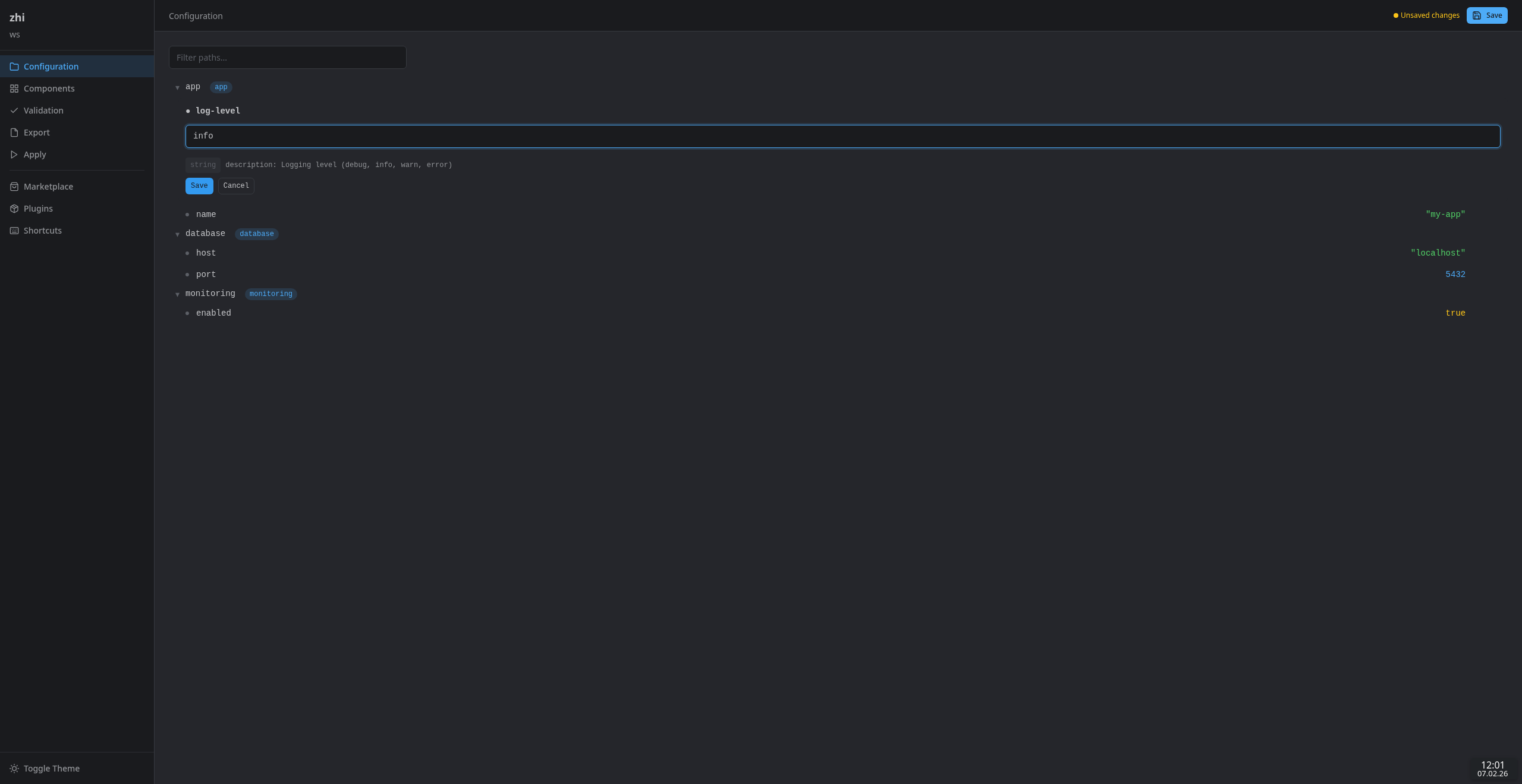
- 🌐 Web UI – browser-based editor served on localhost for a richer editing experience
- 🤖 MCP server – expose configuration management to LLM clients (Claude Desktop, Claude Code, Cursor) via the Model Context Protocol
- 📦 Component model – group configuration into toggleable bundles with dependencies
- 📄 Template-based exports – render configuration to JSON, YAML, TOML, dotenv, or custom templates
- 🚀 Provisioning – trigger external commands (Docker Compose, kubectl, Ansible, etc.) with exported configuration
- 📡 Plugin sharing – install, update, and publish plugins via OCI registries with signature verification, version pinning, rollback, and binary integrity checks
- 🏪 Marketplace – search and rate plugins, verified publisher program, vulnerability advisories
- 🏢 Enterprise mirror –
zhi-mirrorprovides a local OCI pull-through cache with policy controls, audit logging, and air-gapped export/import
🚀 Getting Started
Prerequisites
- Go 1.26+ (only needed when building from source)
Installation
From a release (recommended):
Release archives are named zhi_<version>_<os>_<arch>.tar.gz. Download the
archive for your platform from the
releases page, or fetch it
via the GitHub API:
# Determine the latest version
ZHI_TAG=$(curl -sSL https://api.github.com/repos/MrWong99/zhi/releases/latest | jq -r '.tag_name')
ZHI_VERSION="${ZHI_TAG#v}"

# Linux amd64
curl -sSL "https://github.com/MrWong99/zhi/releases/download/${ZHI_TAG}/zhi_${ZHI_VERSION}_linux_amd64.tar.gz" | tar xz
sudo mv zhi /usr/local/bin/

# macOS arm64 (Apple Silicon)
curl -sSL "https://github.com/MrWong99/zhi/releases/download/${ZHI_TAG}/zhi_${ZHI_VERSION}_darwin_arm64.tar.gz" | tar xz
sudo mv zhi /usr/local/bin/
From source:
go install github.com/MrWong99/zhi/cmd/zhi@latest
Build from repository:
git clone https://github.com/MrWong99/zhi.git
cd zhi
make build
The binary lands in bin/. You’re ready to roll! 🎉
Quick Start
# Initialize a new workspace
zhi init

# View all configuration paths
zhi list paths

# Get a specific value (paths from the scaffolded demo)
zhi get pokedex-web/external_port

# Set a value
zhi set trainer-info/name "Misty"

# Validate the configuration
zhi validate

# Export as JSON
zhi export --format json

# Launch an editor
zhi edit
💻 Interactive TUI Editor

🌐 Web UI Editor
🤖 MCP Server (for LLM Clients)
zhi includes built-in MCP (Model Context Protocol) support, allowing LLM clients like Claude Desktop, Claude Code, and Cursor to manage configurations programmatically. Your AI assistant can now tweak your configs – what a time to be alive!
Stdio transport (recommended for local use):
zhi edit --ui mcp-stdio
Configure in Claude Desktop’s claude_desktop_config.json:
{
  "mcpServers": {
    "zhi": {
      "command": "zhi",
      "args": ["edit", "--ui", "mcp-stdio"],
      "cwd": "/path/to/workspace"
    }
  }
}
HTTP transport (for remote/network access): install the zhi-ui-mcp-sse external plugin. See examples/zhi-ui-mcp-sse/.
📦 Components
Components group related configuration into named bundles that users can toggle:
# List components and their status
zhi list components

# Enable a component (auto-enables dependencies)
zhi component enable redis

# Disable a component
zhi component disable monitoring
Components defined in zhi.yaml control which paths appear in exports and the TUI. See the Components guide for details.
🔍 Verbose / Debug Logging
Pass --verbose to any command to enable debug-level logging to stderr:
zhi validate --verbose
📚 User Guide
Detailed documentation for using zhi:
- Getting Started – installation and first workspace
- Workspace Configuration –
zhi.yamlreference - CLI Reference – all commands and flags
- Components – grouping and toggling configuration bundles
- Export and Templates – template syntax and format helpers
- Apply – running provisioning commands
- Plugin Discovery – discovering and using external plugins
- Sharing and Registries – installing, publishing, and updating plugins via OCI registries
- Marketplace Indexing – adding plugins to the marketplace search index
- Enterprise Mirror – local OCI mirror for air-gapped environments
- Web UI – browser-based configuration editor
🔌 Plugin Development
zhi’s plugin system supports four types: config, transform, store, and UI. Plugins are separate binaries communicating over gRPC – so they can be written in any language that speaks gRPC.
- Plugin Development Overview – shared concepts, binary structure, testing
- Config Plugin API – manage configuration values
- Transform Plugin API – mutate trees before display or after save
- Store Plugin API – persist and retrieve trees
- UI Plugin API – provide interactive frontends
- Meta-Plugin SDK – launch, delegate, and compose child plugins
- Structured File Provider – built-in file-based config provider
- Java Plugin Development – build plugins in Java with GraalVM
- Plugin Scaffolding – generate a new plugin project with
zhi plugin new
🧪 Examples
The examples/ directory contains fully working plugins you can build and experiment with. Go ahead, break things – that’s what examples are for! 🔬
| Example | Type | What it demonstrates |
|---|---|---|
| zhi-config-pokedex | Config | Typed values, metadata, validation – gotta validate ‘em all! |
| zhi-transform-pokedex | Transform | Tree mutation, value mapping |
| zhi-store-json | Store | File-based persistence |
| zhi-store-memory | Store | Minimal in-memory store |
| zhi-store-vault | Store | HashiCorp Vault KV v2 backend |
| zhi-store-mirror | Store (meta) | Meta-plugin: mirrors writes to memory + JSON file |
| zhi-ui-httpapi | UI | HTTP/JSON API with SSE streaming |
| zhi-ui-mcp-sse | UI | MCP server over HTTP for LLM clients |
| zhi-ui-webui | UI | Browser-based Web UI |
| zhi-config-javabean | Config | Java plugin with Bean Validation and GraalVM native-image |
All Go example plugins are published to the GitHub Container Registry on every release and can be installed directly:
zhi plugin install oci://ghcr.io/mrwong99/zhi/zhi-store-memory:v0.0.9
See Sharing and Registries for the full list and details.
Build everything locally with:
make build-all
See the examples README for more details.
🏢 Enterprise Mirror (zhi-mirror)
For enterprise and air-gapped environments, zhi-mirror provides a local registry mirror with:
- OCI pull-through cache – transparently caches artifacts from upstream registries
- Marketplace API proxy – caches and filters marketplace search results
- Policy engine – control which publishers, artifact types, and plugins are allowed
- Audit logging – structured JSON logs of all pull operations for SIEM integration
- Pre-population sync – scheduled syncing of approved artifacts
- Air-gapped export/import – bundle artifacts for transfer to disconnected networks
# Start the mirror server
zhi-mirror serve --listen :5050 --upstream-registry ghcr.io

# Export artifacts for air-gapped transfer
zhi-mirror export --artifacts zhi-project/zhi-config-ansible:v1.2.0 --output bundle.tar

# Import into an air-gapped mirror
zhi-mirror import --input bundle.tar
Clients point to the mirror by setting sharing.defaultRegistry in ~/.zhi/config.yaml or via the ZHI_REGISTRY environment variable. See the Enterprise Mirror guide for the full documentation.
🤝 Contributing
Contributions are welcome – whether it’s a bug fix, a new plugin idea, or improving documentation. Every contribution helps zhi evolve. ❤️
Please read the Contributing Guide to get started. The short version:
git clone https://github.com/MrWong99/zhi.git
cd zhi
make deps
make check
Before opening a pull request, make sure make check passes.
🌍 Community
- Code of Conduct – how we treat each other (tl;dr: be excellent to each other 🤙)
- Contributing Guide – setup, workflow, and code style
- Security Policy – how to report vulnerabilities
- Issue Templates – bug reports, feature requests, and plugin ideas
🀄 The Origin of the Name

The name zhi (pronounced roughly “jrr” in Mandarin) carries layered meanings:
- In Chinese (置), zhi means “to place, set, arrange” – directly resonating with configuration and provisioning.
- In Chinese (智), zhi means “wisdom, knowledge” – emphasizing security, clarity, and correctness.
This multiplicity reflects the project’s vision: to arrange systems securely, with wisdom in design, while remaining flexible and modular.
📜 License
MIT – Copyright (c) 2025 Lukas Schmidt